The short version
- An LCD screen shines one backlight through liquid crystals that act like shutters. Mini-LED is an LCD with thousands of tiny backlight LEDs that can dim in zones. In an OLED, every pixel makes its own light.
- On October 29, 2026, TrendForce forecast OLED laptop shipments to grow nearly 40% in 2026 and more than 40% in 2027. Apple's new MacBook Pro with PROLED XDR Display is a big part of that.
- Apple's panel is tandem OLED: two light-emitting layers stacked, for more brightness and a longer life. It's rated 1,000 nits full-screen and 2,000 nits peak.
- For gaming, OLED wins on contrast and response time. Burn-in and flicker are the trade-offs to know about.
How an LCD makes a picture
Most laptops still use LCD. The screen is a sandwich:
- A backlight at the back, usually a strip of white LEDs along one edge with a sheet that spreads the light evenly.
- A polariser that only lets light through in one direction.
- A layer of liquid crystals, one tiny cell per sub-pixel. Voltage twists each crystal, which changes how much light gets past a second polariser.
- Colour filters: red, green and blue for each pixel.
The crystals never make light. They only block it. That's LCD's weakness: to show black, the crystals try to block a backlight that's always on, and some light leaks through. Watch a dark game scene on a cheap laptop and blacks look grey, with a glow near the edges.
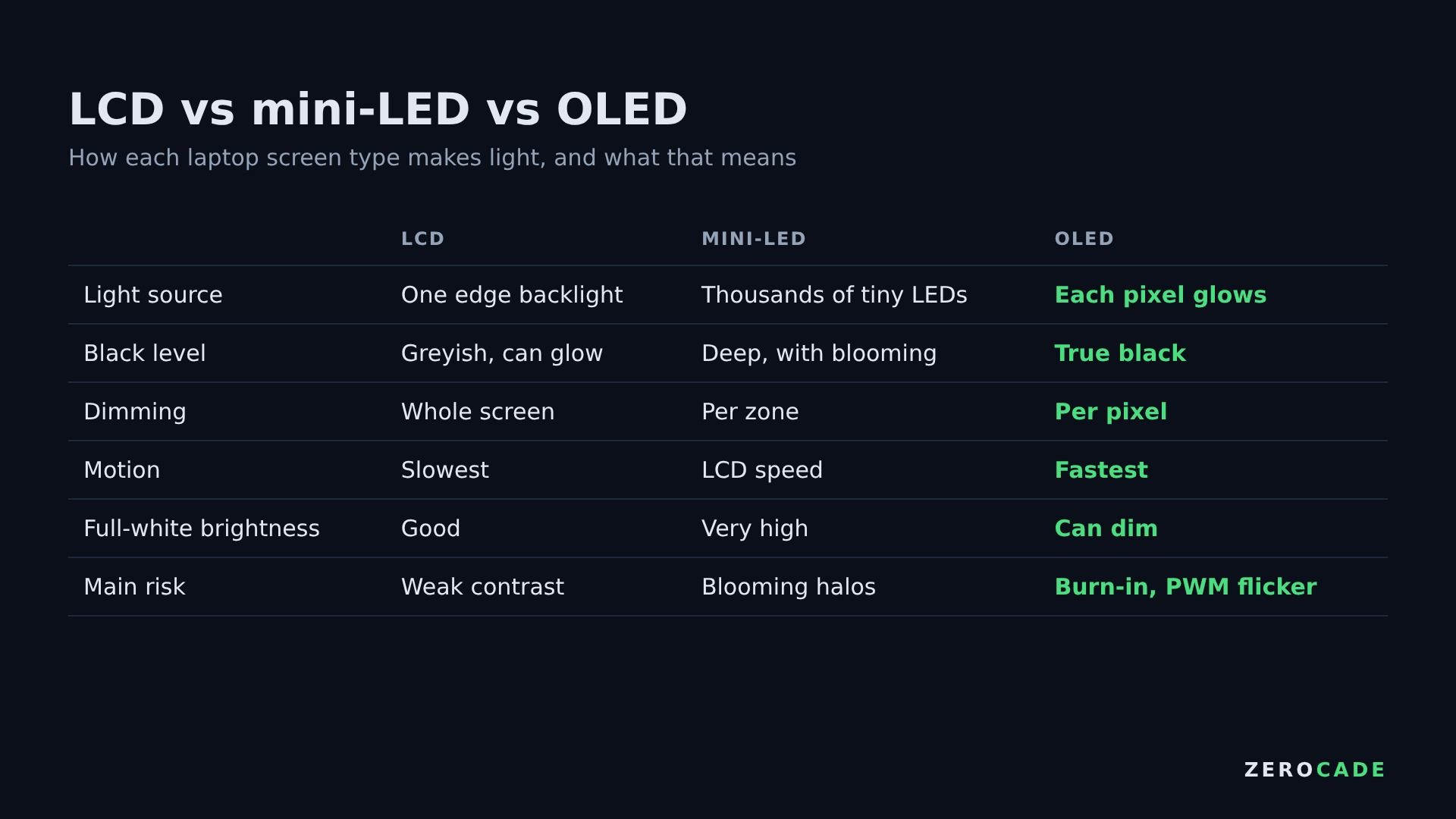 Image: Zerocade
Mini-LED: a smarter backlight
Mini-LED keeps the LCD layers but replaces the edge light with thousands of tiny LEDs spread behind the whole screen, grouped into local dimming zones. A zone behind a dark area switches off while the zone behind a bright area turns up.
Apple's earlier mini-LED MacBook Pros used about 10,000 mini-LEDs in roughly 2,500 zones. That's a lot, but a 14-inch MacBook Pro screen has around 5.9 million pixels, so each zone still covers a couple of thousand of them. Put a bright object on a black background, like a white cursor in a dark menu, and its zone lights up a halo around it. That's called blooming. Mini-LED also needs a good controller. Notebookcheck found that one recent 2,000-nit mini-LED laptop had no working local dimming at all.
OLED: every pixel is a light
OLED stands for organic light-emitting diode. Each sub-pixel is a tiny layer of organic material that glows when current flows through it. There's no backlight. A black pixel is simply switched off, so black is truly black, with no blooming and effectively infinite contrast.
OLED pixels also change state far faster than liquid crystals. An LCD pixel takes several milliseconds to shift colour, which shows up as smearing behind moving objects. OLED pixels switch in a fraction of a millisecond. That's why OLED gaming monitors and phones look so sharp in motion. Our refresh rate vs response time guide explains why both numbers matter.
What "tandem OLED" adds
OLED material wears out as it's driven. The harder you push it for brightness, the faster it ages. Tandem OLED stacks two emitting layers on top of each other. Each layer does half the work for the same brightness, so the panel can go brighter and last longer. Apple first used it on the iPad Pro, and now on the MacBook Pro.

Apple's panel runs at 10 to 120Hz and 254 pixels per inch. TrendForce says that combination is very hard to make, and Samsung Display is currently the only supplier. It's the first product off Samsung's new Gen 8.6 OLED line in Asan, South Korea, which cuts much bigger glass sheets than phone OLED lines. That's the key to cheaper OLED laptops later.
The trade-offs
On paper, OLED isn't perfect:
- Burn-in: pixels that show the same bright thing for hundreds of hours, like a taskbar or a game's HUD, can age faster and leave a faint ghost. Tandem stacks and pixel-shifting reduce the risk but don't remove it.
- Flicker: many OLEDs dim using PWM, flashing pixels on and off very fast. Most people never notice, but some get eye strain at low brightness.
- Full-white brightness: OLEDs often dim when the whole screen is bright white, such as a document. Mini-LED usually holds full brightness better.
- Price: Apple's OLED MacBook Pro starts at ₹3,49,900 ($2,899) in India. Our launch post has every price.
Where laptop screens are heading
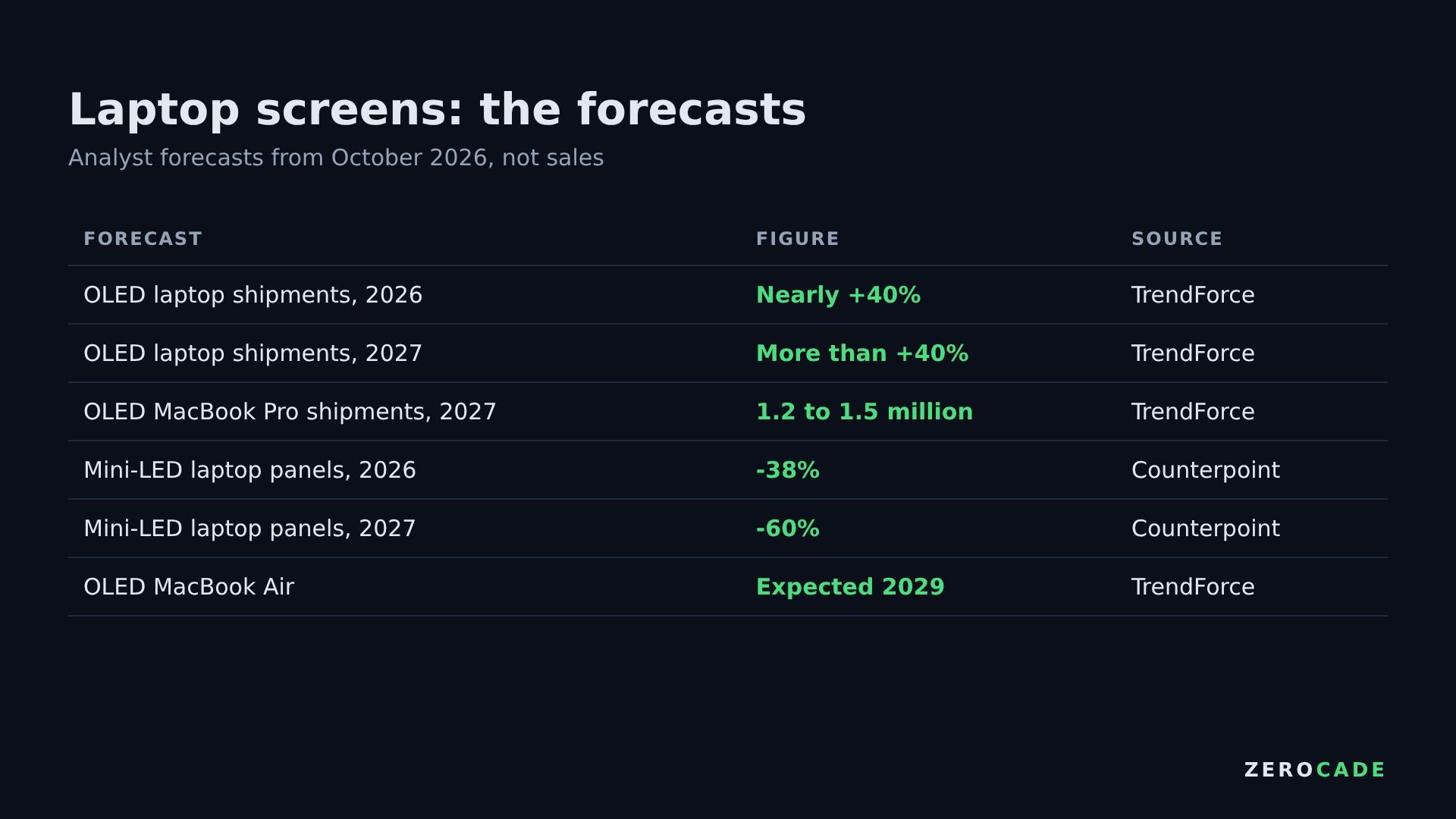 Image: Zerocade
TrendForce expects 1.2 to 1.5 million OLED MacBook Pros to ship in 2027. LG Display, BOE and TCL CSOT are reportedly fighting to supply an OLED MacBook Air, expected around 2029. Counterpoint Research, as reported by Notebookcheck, expects mini-LED laptop panels to fall 38% in 2026 and 60% in 2027.
If you're buying a gaming laptop now, check the panel type on the spec sheet, not the marketing name. Then look for its response time and whether it dims with PWM.