The short version
- Modern console games are split into chunks: separate pieces of data the console can download, install and delete on their own.
- On PlayStation the system is called PlayGo. On Xbox it's Streaming Install plus Intelligent Delivery.
- Chunks are why you can play before an install finishes, and why some games let you delete a campaign or multiplayer mode to free space.
- They're also why GTA 6's pre-load gave so much away: chunk names and sizes are readable even while the game itself stays encrypted.
Why this came up now
GTA 6 pre-loads started on November 10, and within hours dataminers had published the list of chunks inside the PS5 package. That list included world data, textures, a separate story chunk, and a 1.28GB chunk called core_restofworld that appears to be left out of Japan's version.
None of that needed the game to be cracked. It's metadata, the instructions that tell the console how to install the game. So it's worth understanding what those instructions actually do.
Step by step: how a chunked install works
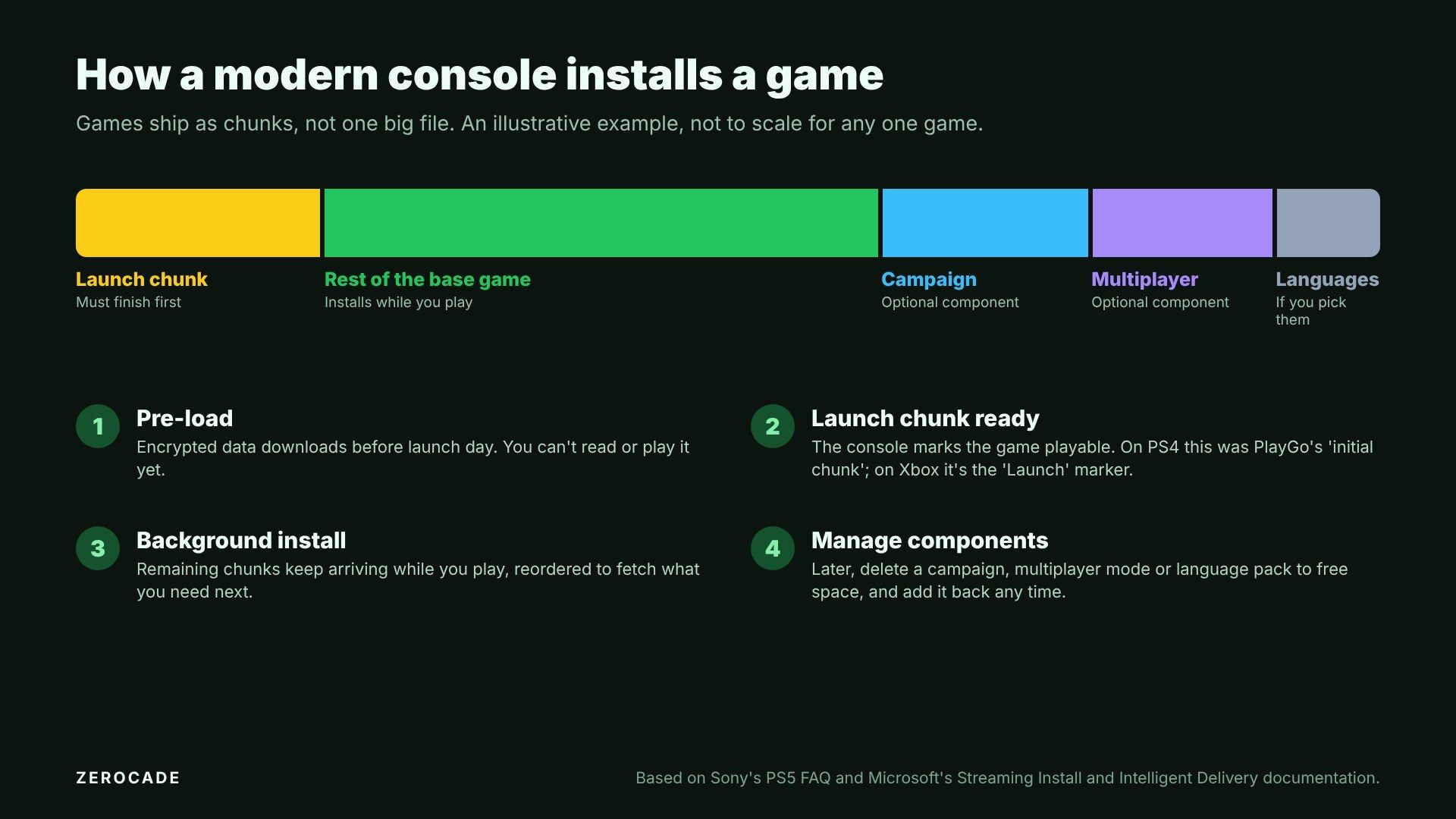
Image: Zerocade
- The developer splits the game into chunks. Each chunk is a group of files: say, the opening area, the textures for one region, a language's voice audio, or the whole multiplayer mode.
- One chunk is marked as the starting point. On PS4, PlayGo called it the initial chunk. Microsoft's documentation calls it the Launch marker, and says the console makes sure that content is on the drive before the game is allowed to launch.
- The rest installs in the background. Once the launch chunk is in, you can play while the other chunks keep arriving. Microsoft says the install carries on even if you switch to another app.
- The order can change as you play. Both systems let a game reorder chunks on the fly, so if you head somewhere new, the data for that area can jump the queue.
A good early example: on PS4, Killzone Shadow Fall was a 39.7GB game with a 7.5GB initial chunk. Guerrilla's technical director admitted at the time that 7.5GB was "quite big", but once it was in, you could start playing.
What changed with PS5
PS4's PlayGo was mostly about getting you into the game sooner. PS5 hands players more control.
Before the PS5 launched, lead architect Mark Cerny told Wired that Sony was moving away from treating a game as one big block of data and allowing finer-grained access to it. Sony's official PS5 FAQ in November 2020 spelled out what that means for you:
- You can prioritise installing the single-player or multiplayer part of a game.
- You can remove modes or content you no longer want, to free up space.
- Developers decide how much of this their game supports.
That last point is important. A game only offers these options if it was built with them in mind.
On PS5, you find them by highlighting a game on the home screen, pressing the Options button and choosing Manage Game Content.
Image: Sony Interactive Entertainment
Real games that use it
| Game | What you can remove | How |
|---|---|---|
| Call of Duty: Black Ops Cold War (PS5) | Campaign, Multiplayer, Zombies, Dead Ops Arcade; multiplayer alone was about 40GB | In-game: Options > General > Game Installs |
| Call of Duty: Modern Warfare III | Campaign | PS5: Manage Game Content. Xbox: Manage game and add-ons |
| Call of Duty: Modern Warfare (2019) | Campaign, Special Ops, Survival and multiplayer data packs | Per Activision's support page |
| Halo Infinite (Xbox) | Campaign, alongside free multiplayer | Manage game and add-ons > Manage installation |
| LEGO Star Wars: The Skywalker Saga (PS5) | Language packs | Manage Game Content |
Call of Duty is the series that uses this most, because its campaign, multiplayer and Zombies modes are effectively separate games sharing one launcher.
How Xbox does it
Microsoft splits the job in two, and its developer documentation is unusually open about how it works:
- Streaming Install handles the order: chunks listed in a layout file, a Launch marker, and background installation.
- Intelligent Delivery handles the choices. Developers define features, such as a campaign or multiplayer mode, that can be added or removed independently, either at install time or later from the dashboard.
Chunks can also be tagged with a language, so a French voice pack only goes to consoles set to French, or with a device, so assets meant for one Xbox model only install on that model.
Microsoft also warns developers that feature names in a package aren't encrypted and can be visible before release. That's exactly how chunk names like GTA 6's leak out.

Image: Microsoft
Why region-only chunks exist
Splitting a game into chunks solves a practical problem for publishers. Instead of building a separate version of the game for every country, they can ship one package and leave certain chunks out in certain regions.
Common reasons:
- Languages. Voice audio for a dozen languages is huge, and most players only use one.
- Ratings and local rules. If a country's rating board needs something changed or removed, a region-only chunk can handle it without a separate build.
- Hardware versions. Assets that only one console model uses can stay off the others.
That's the context for GTA 6's core_restofworld chunk. Dataminers believe it holds content that isn't in Japan's version, and a tiny related piece is missing from Australia and New Zealand's. Rockstar hasn't confirmed what's in either chunk.
How pre-loads fit in
A pre-load is just the chunked install done early. The console downloads the game's data before launch day, but it stays encrypted until the release time, when a small unlock or day-one patch arrives.
That's why the GTA 6 datamine found only names, sizes and feature flags, not missions or maps. The chunk list is readable. What's inside the chunks isn't.
How to use this to save space
A PS5 has 667GB of usable space on the launch model and a bit under 850GB on the 1TB models, and GTA 6 alone asks for up to 212GB. If you're juggling big games:
- Check Manage Game Content on PS5, or Manage game and add-ons on Xbox, for anything you've finished, such as a campaign.
- Remove language packs you don't use, where the game allows it.
- Before you install something huge, look at whether its modes come as separate components, and only install the ones you'll play.
It costs nothing to check, and on a Call of Duty install it can free up tens of gigabytes.