The short version
- From January 26, 2027, you can't sign in to a Nintendo Account with Google or Apple, link one, or create a new account that way. Nintendo posted the notice on November 10.
- Nintendo says the exact end time may be delayed depending on its system work.
- If you use Google or Apple to sign in now, set a password or add a passkey before the date, so you don't get locked out of the eShop or Nintendo's apps.
- This hits a lot of players in India, where people usually set up a US, UK or Japan account on an imported Switch 2, which costs around ₹55,999 on Amazon.in.
What Nintendo says is changing
Nintendo's support notice lists four things that end on January 26, 2027:
- Linking a Google or Apple account to a Nintendo Account.
- Signing in with Google or Apple.
- Creating a new Nintendo Account with Google or Apple.
- The My Nintendo mission that gave Platinum Points for linking a Google account.
After that, you sign in with your Nintendo Account email address or Sign-In ID plus a password, or with a passkey. Nintendo says devices that are already signed in may not ask you to sign in again, but any time a sign-in page appears, Google and Apple won't be options.
Nintendo hasn't given a reason. Its notice simply apologises to people who used a Google or Apple account to sign in.
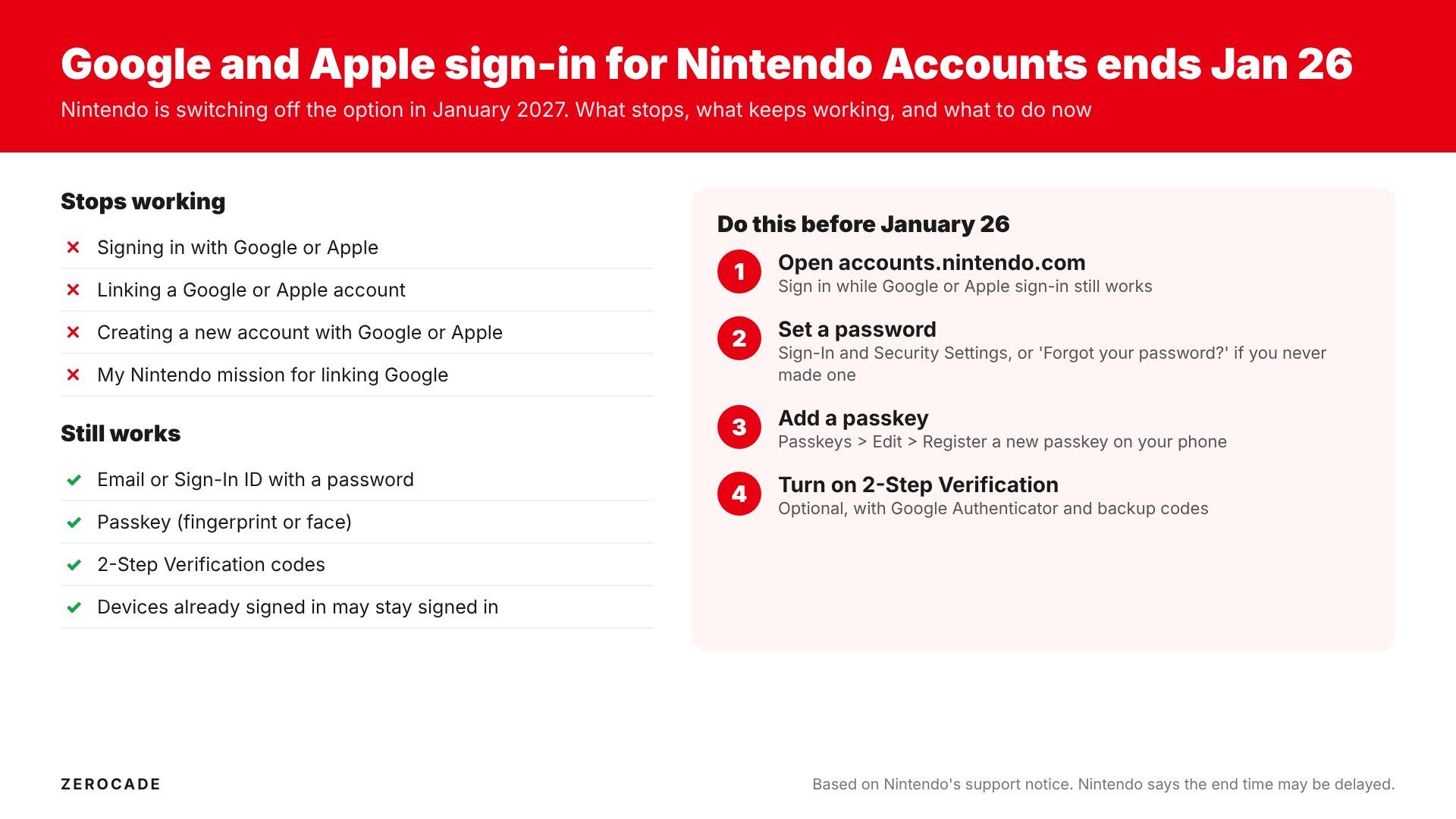
Image: Zerocade
What doesn't change
The notice only covers how you sign in. Nintendo doesn't mention any effect on your games, eShop purchases, save data or Nintendo Switch Online membership, and there's nothing to suggest they're affected. Your account stays the same account. Only the door you use to get into it changes.
The catch: you may never have set a password
If you made your Nintendo Account with Google or Apple, you may never have created a separate password. Nintendo's fix is the normal "Forgot your password?" link on the sign-in page, which emails you a reset link.
If that email doesn't arrive, Nintendo suggests adding no-reply@accounts.nintendo.com to your contacts or safe senders. If you no longer have access to the email address on the account, you'll need to contact Nintendo support to change it, which is much easier to sort out now than after January 26.
How to set a password
- Go to accounts.nintendo.com and sign in. Google and Apple still work until the cutoff.
- Open Sign-In and Security Settings, then select Change next to Sign-In Method.
- Confirm it's you with an email code, password or passkey.
- Enter your new password twice and submit.
Nintendo's rules: at least 8 characters, a mix of at least two of letters, numbers and symbols, and not your date of birth.
How to add a passkey
Nintendo added passkeys in September 2023. They let you sign in with your phone's fingerprint or face unlock instead of typing a password, and work on iOS and iPadOS 16 or later, macOS 13 or later and Android 9 or later. You can register up to 10.
- On the phone or computer you want to use, go to accounts.nintendo.com.
- Open Sign-in and security settings, then Passkeys, then Edit.
- Verify with the code Nintendo emails you.
- Select Register a new passkey, enter your password, and follow your device's prompts.
A passkey works alongside your password, it doesn't replace it, so set the password first.
Image: Nintendo
Worth doing while you're there: 2-Step Verification
Nintendo's 2-Step Verification uses the Google Authenticator app and a set of backup codes. Under 2-Step Verification > Edit, scan the QR code, enter the six-digit code and save the backup codes somewhere safe. It's not available on some child accounts.
There's a good reason to bother. In 2020, around 300,000 Nintendo Accounts were accessed through the old Nintendo Network ID sign-in, and some were used to make purchases through linked PayPal accounts. Nintendo shut down NNID sign-in for Nintendo Accounts afterwards.
Not the first sign-in option to go
Nintendo has done this before. It removed Facebook and Twitter sign-in on October 25, 2022, leaving Google and Apple as the only outside options. With those gone too, the Nintendo Account will rely only on its own email, password and passkey sign-in.
Why players with imported consoles should act early
Nintendo doesn't sell the Switch 2 or run an eShop in India, so most players here buy an imported console, around ₹55,999 for the console alone and ₹63,999 with Mario Kart World on Amazon.in in late October, and set up a US, UK or Japan account. Many do that quickly with a Google sign-in on their phone.
If that's you, losing access means losing the eShop, the Nintendo Switch app and Switch Online (from $19.99 a year in the US) until support sorts it out, with no local Nintendo office to call. Setting a password now takes two minutes. Our earlier Switch 2 23.5.0 update guide also covers how family groups and foreign accounts work together.
What to watch
Nintendo may push the date back, so check its support page closer to January. And if a sign-in prompt ever asks for a Nintendo password you don't remember, use "Forgot your password?" right away rather than waiting for the deadline.